PCIe Expansion on RK3588: Adding SATA, NVMe and Network Controllers
RK3588 has a limited number of native SATA ports and Ethernet interfaces. Building a multi-bay NAS, a multi-port gateway or a high-performance box with an independent SSD almost always means PCIe expansion — and PCIe is precisely where a design can be correct yet deliver only half the expected performance.
First, know which lanes exist and that they are not freely assignable
RK3588 provides several PCIe controllers, but the generation and width combinations are fixed by the chip; they cannot be redistributed at will. The usual arrangement is a few high-speed links plus a few low-speed ones, and exactly which links exist, at which generation and width, must be read from the datasheet item by item.
One direct consequence: different package versions, such as RK3588 and RK3588S, have different PCIe resources. For products with significant expansion needs, confirm that the chosen part’s lane budget is sufficient before designing anything else. This is one of the most substantive differences when choosing between RK3588 and RK3588S.
What you can attach over PCIe
Four categories dominate. NVMe SSDs, which need PCIe 3.0 x4 to reach full speed and are noticeably constrained on a single lane or a Gen2 link. SATA controllers, where one bridge chip adds five or six SATA ports — the standard approach for NAS designs. Network controllers, 2.5GbE or 10GbE, for multi-port gateways and software routers. Wireless and cellular modules, since Wi-Fi cards and 4G/5G modules often use PCIe or USB.
The key point is that total bandwidth is shared. A PCIe 3.0 x4 link offers roughly thirty-two gigabits per second of theoretical bandwidth, while six SATA drives at six gigabits each total thirty-six — already beyond the link. That means when all drives are accessed at full speed, the bottleneck is the PCIe link, not the drives. Multi-bay products must do this arithmetic up front, or the advertised “six bays at full speed” will not materialise on site.
Hardware design considerations
First, the reference clock. PCIe needs a 100MHz reference clock, and fanning it out to multiple devices usually requires a clock buffer; simply paralleling them degrades signal quality. Second, reset sequencing: the order in which reset is released relative to power-up matters, and mishandling it means devices fail to enumerate. Third, power delivery: SSDs draw meaningful peak current, the 3.3V rail must be sized accordingly, and M.2 keying and length specifications must be observed. Fourth, signal integrity: Gen3 rates impose clear requirements on impedance control and length matching, and poor layout typically shows up as failed link training — or a quiet fallback to Gen1 speed.
That fourth point deserves emphasis: link speed degradation happens silently. The system detects the drive, everything looks correct, and the speed is simply a fraction of what was expected. Without checking the negotiated rate rather than merely testing functionality, this reaches mass production undetected.
Verifying the link actually runs at the expected rate
On Linux, use the command-line tools to inspect the negotiated link speed and width, confirming the actual values rather than the device’s maximum capability, then check the kernel log for link-training warnings. Both steps belong in the prototype phase and in the hardware acceptance checklist.
If a downgrade is found, the usual order of investigation is: sufficient power delivery and a clean reference clock first, then trace impedance and length matching, and only then the chip configuration.
A typical approach: separating system and data storage
Boards such as the 04A NAS-RK3588 network storage board are designed around attaching SATA or NVMe controllers over PCIe and dividing labour with on-board storage: the operating system runs on board storage while data drives go over PCIe. This brings two benefits — system and data storage do not interfere with each other, and even if every data drive drops out, the system still boots and can report the fault.
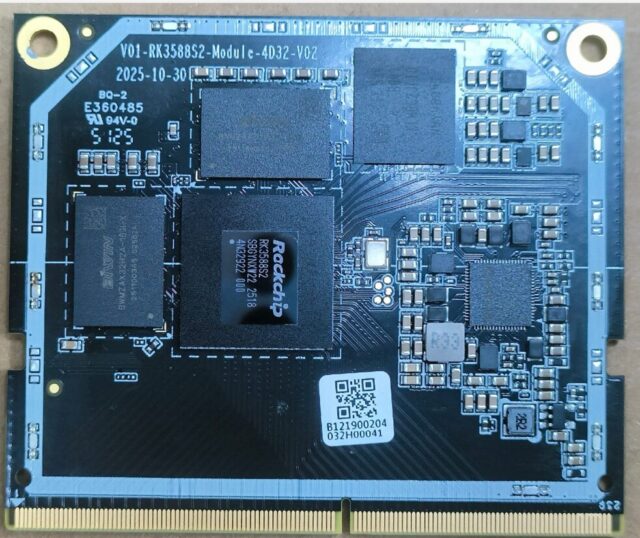
With a system-on-module approach, the difficult high-speed design can be delegated to the module vendor. The 01M M-RK3588S system-on-module integrates SoC, memory and storage inside the module so the carrier handles relatively low-speed peripherals, while the 01A RP01A-RK3588S-5D32 is a board-level form suited to going straight to production. Which to choose depends on your team’s high-speed design capability and production volume.
Conclusion
The design order is: establish the chosen part’s lane budget, compute total bandwidth from the target peripherals and confirm the link will not be the bottleneck, address reference clock, reset sequencing, power and signal integrity, and finally measure the negotiated rate on the prototype. Functionality working does not mean performance is met — rate verification belongs in the acceptance checklist.