Mini PC or Edge Box: How to Decide Between Two Form Factors
After the SoC is settled, one choice is often overlooked: form factor. The same compute in a mini PC versus an edge box differs greatly in mounting, thermal path, connector layout and long-term maintenance. Getting the shape wrong rarely means insufficient performance — it means it will not fit, will not stay cool, or cannot connect what you need.
What Each Shape Solves
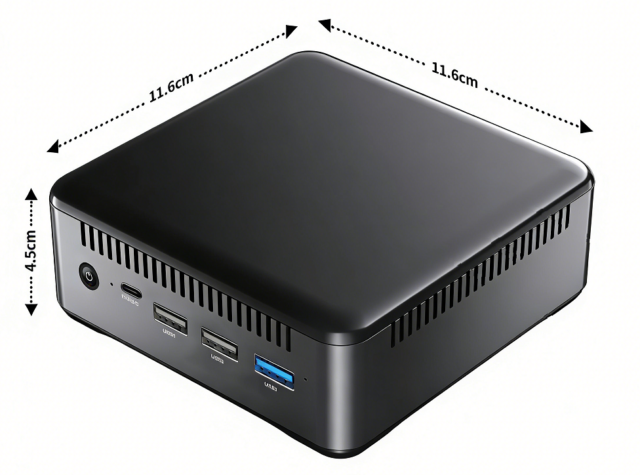
A mini PC is conceived as “a small computer”: generous ports (several USB, multiple video outputs, audio), sits on a desk or mounts behind a monitor, easy to attach peripherals. It suits scenarios with many external devices, or where someone works beside it.
An edge box is conceived as “a deployment unit”: compact, rail or wall mountable, with ports aimed at industry and the field (serial, multiple Ethernet, CAN, isolation). It suits unattended operation in racks or field cabinets. The difference is not performance but mounting and port orientation.
Look at the Installation Environment First — It Is the Hardest Constraint
The hardest constraint in choosing a shape is where the device will be mounted. Standard rack or DIN rail → a box is almost the only answer. On a desk or behind a monitor → a mini PC is more natural. Inside a field control cabinet → check cabinet depth and thermal conditions. If this condition is not met, nothing else matters, so confirm it first.
A mini PC such as the 01H MINI PC-RK3588 is flexible for desk and wall mounting with ports suited to keyboard, mouse, display and peripherals directly; an edge box such as the 02A EDGE-RK3576 V1.1 is more specialised for rail mounting and field interfaces.
Port Orientation: What Are You Connecting?
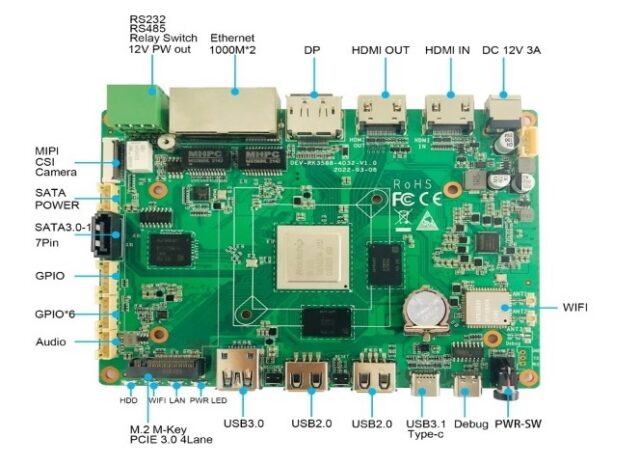
The second judgement is ports. Consumer and office peripherals (keyboard, mouse, display, printer, speakers, USB camera) → a mini PC’s USB and video outputs are more complete. Industrial and field interfaces (isolated serial, multiple Ethernet, CAN, GPIO, wide-voltage input) → an edge box is designed for exactly those.
A common mistake is using a mini PC for industrial equipment and bridging with converters — every adapter adds a failure point and makes field maintenance harder. Equally, using an industrial box for a pile of consumer peripherals leaves you short on ports and convenience. List everything you need to connect and the shape largely decides itself.
Thermal Path and Mounting Density
Shape also determines how heat leaves. Mini PCs usually have more internal volume and a designed airflow path, suiting a single unit in open surroundings. Edge boxes are typically fanless and passive, conducting through the case or rail — better for dense installation, dust and low-maintenance sites, but dependent on ambient temperature and contact with the mounting surface.
Where many units must fit into limited space, fanless boxes stack and line up more easily; where one unit sits in a well-ventilated spot, a mini PC’s thermal headroom is usually more comfortable.
Similar Compute, Different Shape
When two models sit at a similar compute tier, choosing between something like the 01B EDGE-RK3588-4D32 V1.2A and a mini PC comes down entirely to shape: the former for field and rack deployment with industrial ports, the latter for desk, wall mounting and consumer peripherals. There is no need to agonise over performance — decide from installation environment and port list.
Decision Checklist
Choose a mini PC when: desk or behind-monitor mounting, consumer peripherals, full video and audio connectivity, single-unit deployment in a ventilated space. Choose an edge box when: rail, rack or field cabinet mounting, industrial interfaces, unattended operation, dense deployment, dust or vibration.
If both remain viable, make the final call on the port list — write down every device to be connected, and pick whichever shape connects them directly without adapters. In practice that rule almost always produces the right answer.