Self-Service Kiosk Hardware: Touch, Peripherals and 7×24 Operation
Self-service kiosks — information points, queue terminals, self-checkout, vending — share one characteristic: they sit in public spaces, run unattended, and a failure immediately affects the business. Unlike office equipment, there is no “wait for someone to fix it”; there is a user standing there right now. So hardware selection has little to do with performance and almost everything to do with reliability and serviceability.
Two Shapes: All-in-One or Host Plus Screen
An all-in-one integrates host, touch and display — compact and quick to install, but a fault takes the whole unit offline and the point of service is dead meanwhile. Host plus screen puts a separate host inside the cabinet, with display and touch independent, so a fault means swapping a host or a screen.
For projects with many dispersed points, the serviceability advantage of host plus screen is dramatic: stocking one host is far cheaper than stocking a whole machine, and a field swap does not disturb the structure or cabling. A compact, well-connected host such as the 01H MINI PC-RK3588 suits hiding inside a cabinet — driving the large display while carrying every peripheral.
Touch and Display: Fix the Interface Early
Kiosk touch is implemented in a few ways: USB touch (most common, over the USB channel), or the panel maker’s own driver scheme. The touch interface must be settled at selection stage — USB or otherwise, whether an extra driver board is needed, and any cable-length limit. That determines the host’s port requirements and how freely the panel can be changed later.
On display, match resolution to interface version: the HDMI version the large panel uses, required resolution and refresh rate, and whether HDCP applies. Higher resolution raises decode demands, but kiosks mostly render interfaces and graphics, so the load is modest.
Peripherals: Printing, Scanning, Card Reading, Cameras
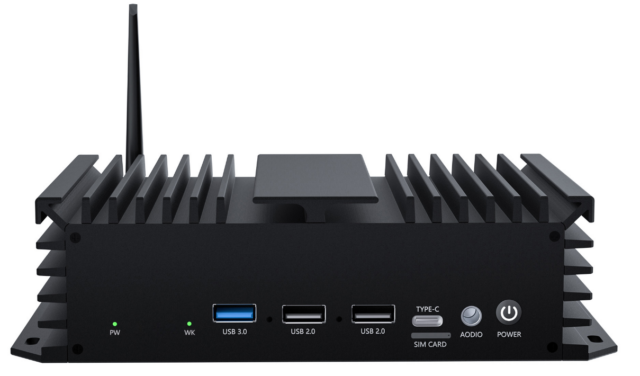
Kiosks carry many peripherals with mixed interfaces. Printers commonly run serial or USB; scanners are usually USB (keyboard-emulation) or serial; card and ID readers may be serial or USB; cameras run USB or MIPI. Some also need to drive cabinet locks, indicator lights or solenoids, which means GPIO or relay control.
Once listed, the host’s port requirements are clear. For projects with many peripherals needing GPIO or serial control, a board with isolated serial and industrial interfaces such as the 05A IPA-RK3588 工业控制主板 is more comfortable; where peripherals are mostly USB and the shape is closer to a commercial terminal, an edge host like the 02A EDGE-RK3576 V1.1 is more flexible.
Designing for 7×24 Operation
Continuous running tests three things: thermals (cabinet interiors are enclosed and poorly ventilated, so budget power for the worst case), power-loss protection (public areas get switched off casually, so filesystem and data integrity must survive it), and automatic recovery (can the machine return itself to a usable state after a hang).
Automatic recovery is the most overlooked and the most visible: if a frozen unit needs a human to reboot it, every fault becomes a site visit. The specification should therefore call out watchdog and auto-restart behaviour, plus auto-start on power restore.
Structure and Environment
Public-space equipment also needs dust management, accidental-touch prevention and secure fixing. Dust accumulating inside a cabinet degrades cooling significantly, so plan intake filters and maintenance intervals. Whether the site has direct sunlight (affecting legibility and temperature) or gets bumped by passers-by also shapes the form factor and mounting.
Selection Checklist
Five steps: fix the shape (integrated or split, by site count and serviceability) → fix touch and display interfaces → list peripherals with interfaces → confirm reliability design (thermal, power loss, auto recovery, auto-start on restore) → confirm fleet capability (imaging, remote ops, spares).
With site count, peripheral list and installation environment (indoor / semi-outdoor, cabinet ventilation) written down, a supplier can propose shape and configuration precisely — and surface thermal or interface problems before they become expensive.